Burning Bridges AI video generator: Put yourself in the Burning Bridges party
Upload one photo. Get a 10-second vertical video of you in the chandelier-lit party, ready for TikTok and Reels.Upload one photo. We film you in the chandelier-lit party — cup up, waving at the lens, the room cheering — as a 10-second vertical video ready for TikTok and Reels.
 0:10
0:10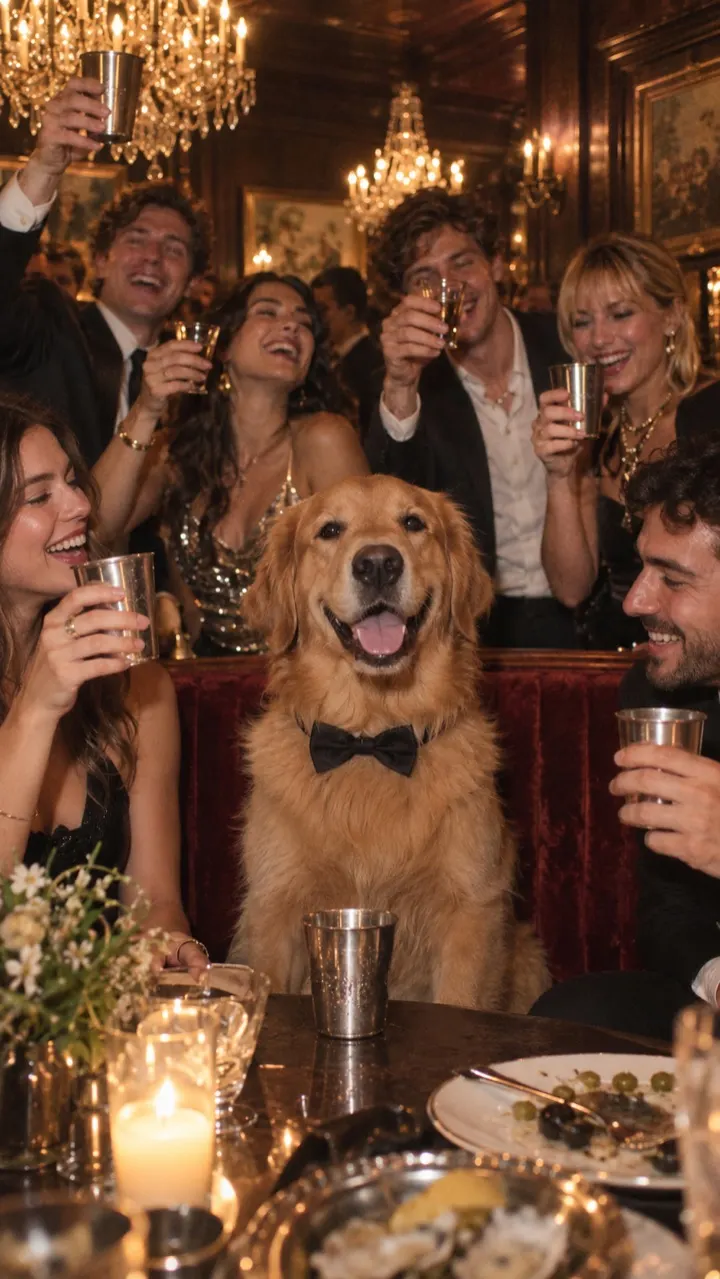 0:10
0:10 0:10
0:10
- Ready in about 3 min
- Auto refund if it fails
- Photos deleted after 7 days

One photo in, one party out
Clips from the trend right now. Yours lands in the same chandelier room, starring your photo.
Three steps to the table
Upload one photo
A selfie is enough. Pets work too.A selfie is enough. One face, looking at the camera, decent light. Your dog or cat works too.
We film the party
About 3 minutes. We email you when it’s ready.Chandeliers, silver cups, a packed room, a camera that follows you. About 3 minutes. We email you when it’s ready.
Post it with the sound
Add the official Burning Bridges sound on TikTok or Reels.Download the vertical video, open TikTok or Reels and pick the official Burning Bridges sound. That’s how the trend counts it.
Made for the trendMade for the trend, not a blank canvas
General video tools hand you an empty prompt box. This one already knows the party, the shots and the timing, so the only thing you bring is the face.
Vertical from the first frame
Most Burning Bridges generators copy the wide 16:9 music video frame, so you end up cropping heads off before you post. We film the party natively in 9:16 for TikTok, Reels and Shorts. Need it wide for YouTube or a group chat? Pick 16:9 instead, at the same price.
No prompt, no timeline
The five shots are written, timed and tested: stepping out of the crowd, cup up and waving, dancing, scanning the room, arms up as the table jumps. You don’t describe a scene or guess at camera moves. Upload, press the button, done.
People and pets
A selfie works, and so does a photo of your dog or cat. Pets become the guest of honour, with the room cheering around them. It’s the easiest way to make a version nobody else on your feed has.
Pay once, keep it
No subscription to cancel after the trend moves on. Buy a pack, use it today or next month: videos never expire, there’s no watermark, and a video that fails goes straight back into your pack.
Your 10 seconds, beat by beat
- 00:00Steps out of the crowd, cup pointed at the lens
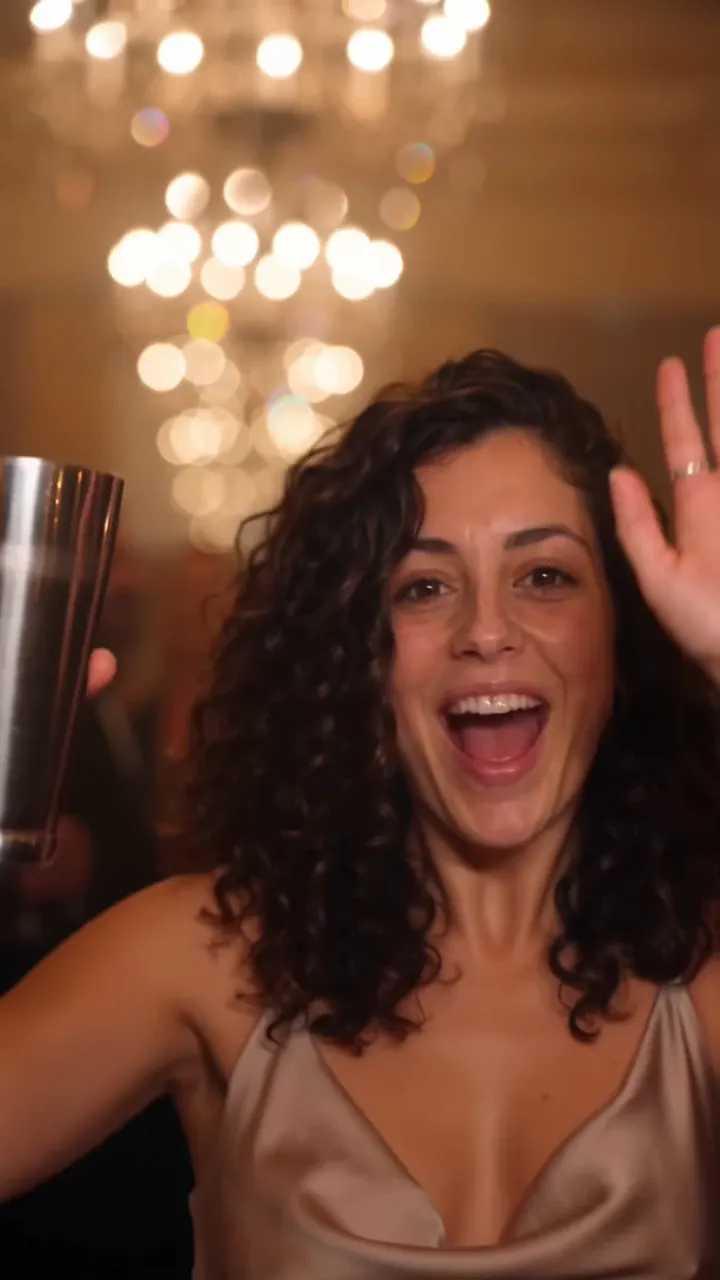
- 00:02Close-up wave, cup raised, big grin
- 00:04Sways to the beat as the room moves
- 00:06Hand over the eyes, scanning the room
- 00:08Arms up as the whole table cheers
Pay per videoPay per video. No subscription.
No subscription. Videos never expire.Videos never expire. If a video fails, it goes back into your pack automatically.
1 video
Try the trend once.
$4.99- 1 Standard video (480p)
- HD 720p starts with the 3-pack
- 10 seconds, vertical or wide
- No watermark
- Never expires
- Auto refund if a video fails
- Most picked
3 videos
Save 20%You, your partner, your dog.
$11.99Instead of $14.97$4.00 each- 3 Standard videos (480p)
- or 1 HD video (720p)
- 10 seconds, vertical or wide
- No watermark
- Never expires
- Auto refund if a video fails
10 videos
Save 40%Put the whole group chat in.
$29.99Instead of $49.90$3.00 each- 10 Standard videos (480p)
- or 5 HD videos (720p)
- 10 seconds, vertical or wide
- No watermark
- Never expires
- Auto refund if a video fails
- 10 seconds, vertical or wide
- No watermark
- Never expires
- Auto refund if a video fails
- Secure checkout by Stripe
- Card, Apple Pay or Google Pay
- Unused pack? Refund within 14 days
- Photos deleted after 7 days
First-try tipsGet a great video on the first try
Pick one clear face
A recent selfie in daylight beats a studio portrait with heavy filters. One person, facing the camera, nothing over the face: no sunglasses, masks or stickers. The model copies what it can see, so the clearer the face, the more it looks like you.
Standard or HD
Standard 480p is sharp on a phone screen and uses 1 video from your pack. HD 720p uses 2 and holds up better on a laptop or TV. If you’re only posting to TikTok or Reels, Standard is plenty.
Add the sound when you post
Your video arrives silent. On TikTok or Reels, tap Add sound and pick the official Burning Bridges audio. That links your clip to the trend page, which is where most of the views come from.
The trendThe Burning Bridges AI trend, in short
The trend borrows the look of Drake’s Burning Bridges video: a chandelier-lit dinner party where the host steps forward, raises a cup, waves at the lens and works the room while everyone cheers. Creators started recreating the moment with AI video tools in early October 2026, swapping themselves, their friends, TV characters and pets into the host’s seat.
Doing it by hand means writing a long prompt, finding a tool that keeps your face, fixing the aspect ratio and lining up the timing. Our step-by-step guide covers that route, and the exact prompt we use is free to copy if you want to try it in another tool.
Or skip all of it: upload one photo above and get the finished 10-second video in about three minutes. TryBurningBridges is an independent fan tool. We don’t use any footage or audio from the music video, and we aren’t affiliated with Drake or his labels.
Keep reading
All guidesWhat is the Burning Bridges AI trend (and where it started)
4 min read · Updated
How to do the Burning Bridges AI trend
4 min read · Updated
Burning Bridges AI trend ideas: TV show, sports and pet versions
4 min read · Updated
FAQBefore you pull up
What is the Burning Bridges AI trend?
A short-video trend built around Drake’s song Burning Bridges. People post a clip of themselves as the host of a chandelier-lit party: cup raised, waving at the camera, scanning the room, the whole table cheering. TryBurningBridges makes that clip from one photo of you.
Do I need to write a prompt?
No. The shots, the setting and the timing are built in. You upload one photo and press Make my video. If you’re curious, the prompt page shows the prompt we use.
Does the video include the song?
No. Add the official Burning Bridges sound when you post on TikTok or Reels — it’s two taps, and it’s what puts your video in the trend.
What photo works best?
One clear face, looking at the camera, in good light. A plain selfie is perfect. Avoid group shots, sunglasses and heavy filters. Pets work too: pick a photo where your dog or cat faces the lens.
Can I make one with my dog or cat?
Yes. Upload a photo of your pet and it becomes the guest of honour, with the crowd cheering around it. Use a photo where your pet is looking at the camera.
Can I get it in 16:9 for YouTube?
Yes. Pick vertical 9:16 for TikTok, Reels and Shorts, or wide 16:9 for YouTube and group chats, before you make the video. Both cost the same.
How long does it take?
About 3 minutes. You can close the tab while it renders: we email you when it’s ready, and it waits for you in My videos.
How much does it cost?
One video is $4.99, three are $11.99 and ten are $29.99. You pay once: there’s no subscription and your videos never expire. A Standard 480p video uses 1 video from your pack; HD 720p uses 2.
Is there a free version?
No. Every video is a real render, so there are no free credits or trial videos. If you want to experiment first, the prompt page has our full prompt for free: paste it into any tool that makes video from a photo.
What if my video fails?
It goes back into your pack automatically. Nothing to claim and no one to email. Try again, usually with a clearer photo.
What happens to my photo?
It’s used only to make your video and is deleted automatically 7 days after upload. Your finished videos stay in your account until you delete them.
Can I use a photo of a celebrity or a kid?
No. No celebrities or public figures, and no one under 18. Only upload photos of yourself, your pet, or someone who has agreed to it, and that you have the rights to use.
Is this the official music video?
No. TryBurningBridges is an independent fan tool. It is not affiliated with, endorsed by or connected to Drake, OVO Sound, Republic Records or Universal Music Group, and we don’t use any footage or audio from the music video.